Your layout was built at 8.5 x 11 inches, and the order page says A4. On screen the two files look close enough, but A4 vs Letter is not a paper-size technicality: one is wider, one is taller, and the mismatch shows up at the trim.
This guide gives the true dimensions, the exact place a Letter layout breaks on an A4 page, the three ways to fix it, and a check before export. By the end, you will know which fix fits your design and how to send a print file that prints right the first time.
The short version
- A4 measures 210 x 297 mm, or 8.27 x 11.69 inches.
- US Letter measures 8.5 x 11 inches, or 215.9 x 279.4 mm.
- Letter is 5.9 mm wider and 17.6 mm shorter than A4.
- A5 and half letter follow the same wide versus tall story at half size.
- Re-layout is the only fix that keeps edges, margins, and type sizes as designed.
- Set the document to the product size with 3 mm bleed on every edge before export.
A4 vs Letter: the true dimensions
The four sizes in this comparison break down as follows.
| Size | Millimeters | Inches | Shape (short to long side) |
|---|---|---|---|
| A4 | 210 x 297 | 8.27 x 11.69 | 1 to 1.414 |
| US Letter | 215.9 x 279.4 | 8.5 x 11 | 1 to 1.294 |
| A5 | 148 x 210 | 5.83 x 8.27 | 1 to 1.414 |
| Half Letter | 139.7 x 215.9 | 5.5 x 8.5 | 1 to 1.294 |
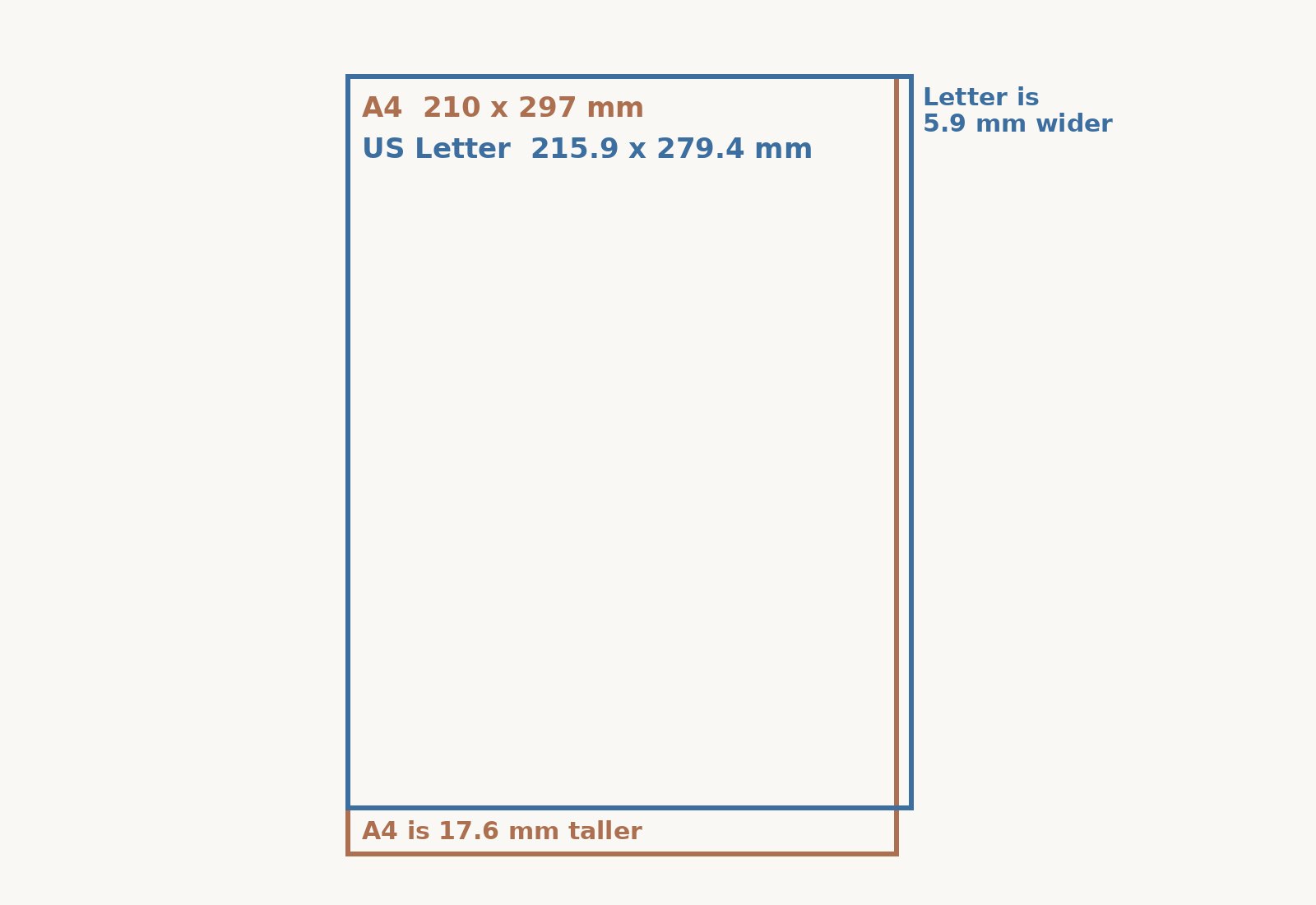
Notice the shapes. A4 and A5 keep a ratio of 1 to 1.414, the square root of 2, so halving an A size keeps the same proportions. US Letter and half letter keep a squatter ratio of 1 to 1.294. That difference is why neither page fits inside the other: Letter is 5.9 mm wider than A4 and 17.6 mm shorter, so placing one on the other always clips a side or leaves a gap.
What goes wrong with a US Letter file on an A4 product
Print an unchanged US Letter file on an A4 product and the first thing you lose is the side edges. About 3 mm comes off each side, and the page stops 17.6 mm short of the A4 bottom edge unless the background is extended. Stretching the page to fill A4 distorts type and images, so it is not a fix.
This catches people because US home and office software and printers usually default to a letter size page. Many design templates offer Letter and A4 side by side, so the original canvas stays on 8.5 x 11 inches without the designer noticing.
On Paperlust Print Shop US pages, the product sizes are A4 and A5. US Letter is not a size on these products. The places where the mismatch shows up first are the A4 booklets range and the Standard menus range, because the booklet range is A4 and the menu range includes A4 and A5 sizes.
Crop, scale, or re-layout: three fixes compared
The table below shows what each fix costs and when it is worth using.
| Fix | What happens on an A4 page | Keeps type size | Use it when |
|---|---|---|---|
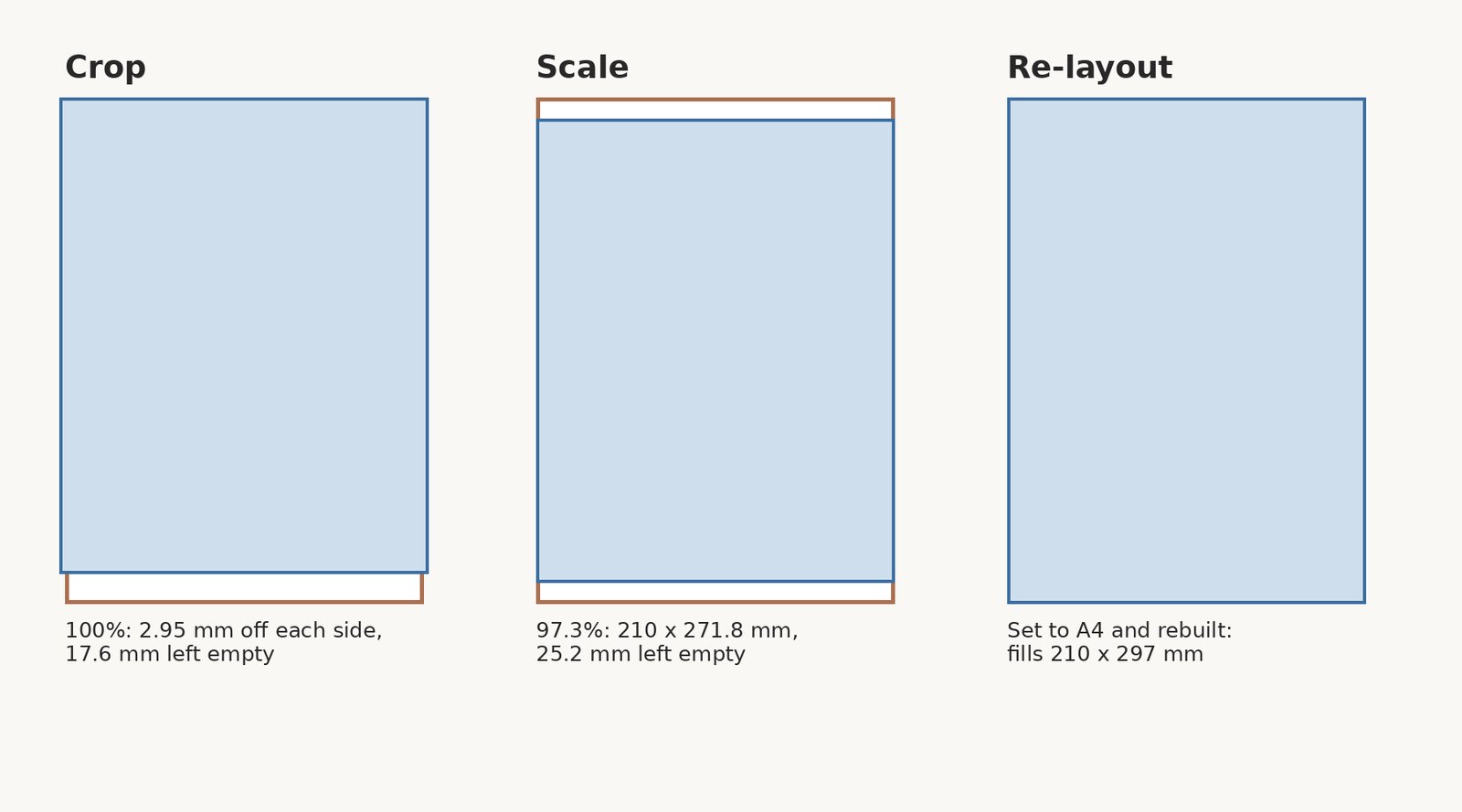
| Crop | Place the Letter page on A4 at 100 percent. About 3 mm comes off each side edge and a 17.6 mm band is left empty in the height unless the background is extended. | Yes | A photo background can tolerate a side crop. |
| Scale | Shrink the whole Letter page to 97.3 percent so the width fits 210 mm. The page then measures 210 x 271.8 mm and leaves 25.2 mm of empty height. Type and images shrink by 2.7 percent. | No (97.3 percent) | The page has centered content and you plan the white space. |
| Re-layout | Change the document size to A4 and move or reflow the content to the A4 shape. | Yes | Dense text, edge to edge borders, or anything where type size must not change. |
Crop is the simplest fix and the most visible one. Place the Letter page on A4 at 100 percent, and about 3 mm disappears from each side edge. If the layout has a full bleed photograph or a soft background, that side loss is usually acceptable. The taller A4 canvas leaves a 17.6 mm band empty unless the background is extended.
Scale shrinks the whole Letter page to 97.3 percent so its width fits the 210 mm A4 width. The scaled page measures 210 x 271.8 mm and leaves 25.2 mm of empty height. Type and images shrink by the same 2.7 percent, so the white space has to be designed in rather than left as an accident.
A re-layout changes the document size to A4 and lets you move or reflow the content into the taller shape. It is the only route that keeps edges, margins, and type sizes as designed. Dense text, tables, and edge to edge borders are the cases that need this fix.
Half letter versus A5: the small-format mismatch
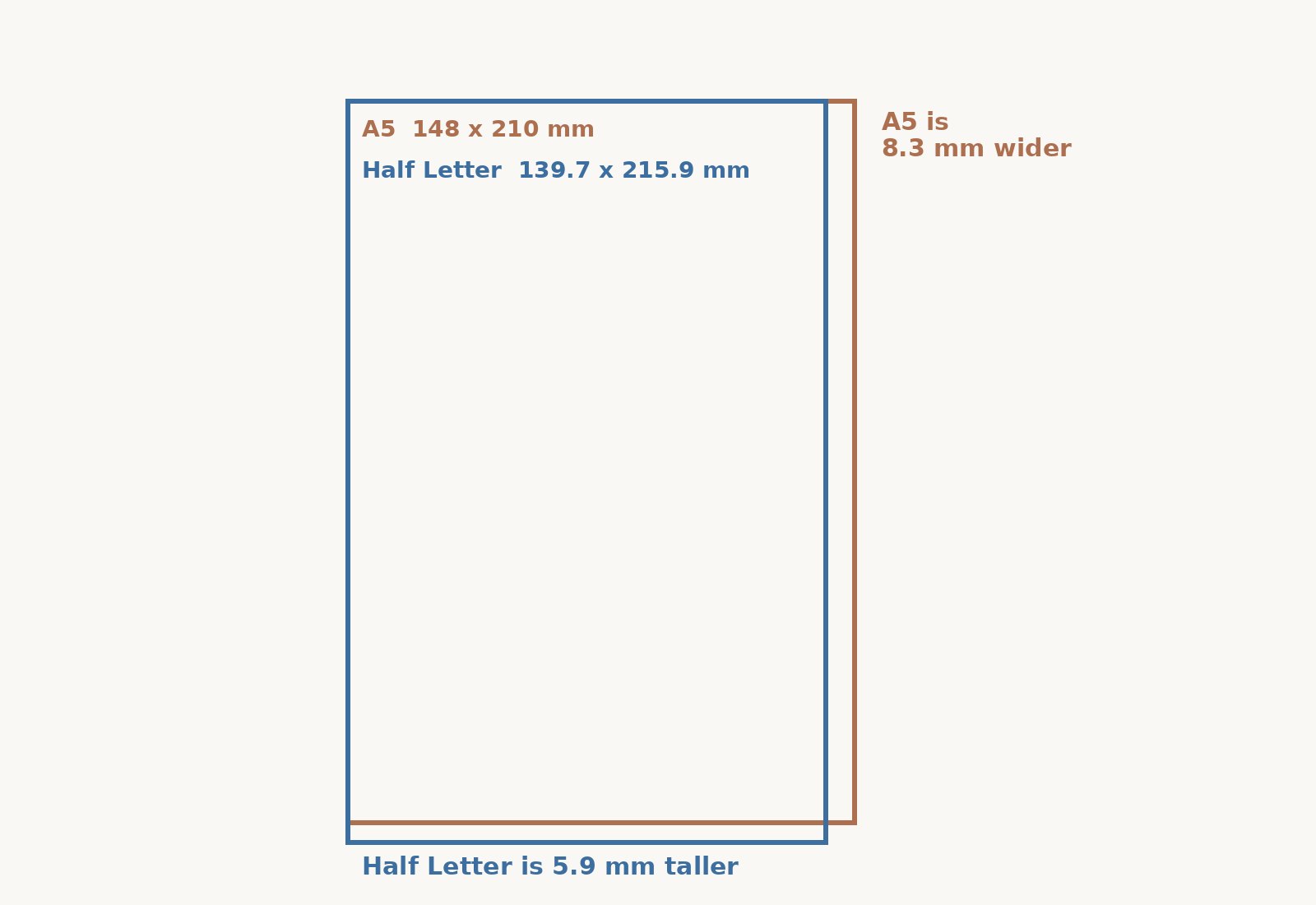
At half size, the same mismatch repeats. A5 is 148 x 210 mm, or 5.83 x 8.27 inches, and it is half of A4. Half letter is 5.5 x 8.5 inches, or 139.7 x 215.9 mm, and it is half of Letter. A5 is 8.3 mm wider and 5.9 mm shorter than half letter, so a half letter file needs the same crop, scale, or re-layout decision before it is used for an A5 product.
For menus, programs, and small booklets, the matching Paperlust products are A5 booklets, built at 148 x 210 mm, and the flat A5 menu in the Standard menus range.
Bleed and safe area in the print file
Set the print file to the product size before you add bleed. A4 is 210 x 297 mm. A5 is 148 x 210 mm. Keep text and important elements at least 3 mm inside the trim, and extend any artwork that reaches the edge by 3 mm beyond the trim on every side. A full bleed A4 page therefore becomes 216 x 303 mm.
For images, check the resolution against the finished print size using the pixels and DPI guide. If the product is an A4 or A5 booklet, the printed page count runs 8 to 56 pages in steps of 4 and includes the 4-page cover. For booklet page order and spread questions, use the set up a booklet guide.
The print file export check before upload
Run this quick list before you upload the print file.
- Check the document size reads 210 x 297 mm for A4 or 148 x 210 mm for A5, not 8.5 x 11 in.
- Set bleed to 3 mm on every edge.
- Check that no text or important element sits in the outer 3 mm.
- Make sure the PDF page count matches the product, including any cover pages.
- Export a print-ready PDF, SVG, or Adobe Illustrator file.
After the order is placed, Paperlust emails a proof. Nothing prints until you approve it, so use that proof to look for the trim and any side loss before you give the go ahead. When the layout is settled, choose a stock with the paper weight guide so the finished piece feels right in hand.
Frequently asked questions
What is the A4 size in inches?
A4 is 210 x 297 mm, which is 8.27 x 11.69 inches. The shape keeps a ratio of 1 to 1.414, the square root of 2, so an A4 page is slightly narrower and noticeably taller than a US Letter page. When you set up a print file, use the millimeter dimensions if your software offers them, and keep the 8.27 x 11.69 figure for quick visual checks.
Is A4 bigger than Letter?
It depends on the direction you measure. A4 is taller than Letter, but Letter is wider than A4. US Letter is 5.9 mm wider and 17.6 mm shorter than A4, so neither size is bigger in every direction. That mixed comparison is why a Letter layout cannot simply drop onto an A4 page without a crop, a scale, or a re-layout.
Can I upload a Letter file for an A4 product?
You can, but it should be adjusted first. US Letter is not a size on Paperlust A4 and A5 products, so an unchanged Letter file will have its sides trimmed or its height left short. A re-layout keeps everything as designed. A scale to 97.3 percent fits the width but leaves empty height, so the design has to absorb that space.
How much should I scale Letter to fit A4?
Set the scale to 97.3 percent. That shrinks the whole Letter page so its width fits the A4 width of 210 mm. The scaled page then measures 210 x 271.8 mm and leaves 25.2 mm of empty height. Type and images shrink by the same 2.7 percent, so scale is workable when the layout has centered content and you plan for the extra space.
Is A5 the same as half letter?
No. A5 is 148 x 210 mm, or 5.83 x 8.27 inches. Half letter is 5.5 x 8.5 inches, or 139.7 x 215.9 mm. A5 is 8.3 mm wider and 5.9 mm shorter than half letter, so the two small sizes repeat the same wide versus tall mismatch as A4 and Letter. A half letter file needs the same fix before being used for an A5 product.
What bleed should I add?
Add 3 mm of bleed on every edge. Artwork that reaches the trim extends 3 mm beyond it, and text and important elements sit at least 3 mm inside the trim. An A4 page with bleed is 216 x 303 mm. Set the bleed in the document setup and carry it through the PDF export before you upload the print file.